


Page 41 - Learn To Program With Scratch
P. 41
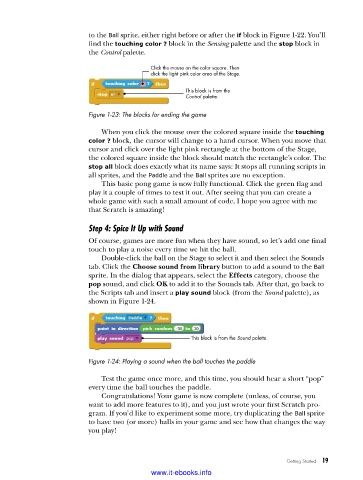
to the Ball sprite, either right before or after the if block in Figure 1-22. You’ll
                          find the touching color ? block in the Sensing palette and the stop block in
                          the Control palette.

                                           Click the mouse on the color square. Then
                                           click the light pink color area of the Stage.

                                                     This block is from the
                                                     Control palette.

                          Figure 1-23: The blocks for ending the game

                             When you click the mouse over the colored square inside the touching
                          color ? block, the cursor will change to a hand cursor. When you move that
                          cursor and click over the light pink rectangle at the bottom of the Stage,
                          the colored square inside the block should match the rectangle’s color. The
                          stop all block does exactly what its name says: It stops all running scripts in
                          all sprites, and the Paddle and the Ball sprites are no exception.
                             This basic pong game is now fully functional. Click the green flag and
                          play it a couple of times to test it out. After seeing that you can create a
                          whole game with such a small amount of code, I hope you agree with me
                          that Scratch is amazing!

                          Step 4: Spice It Up with Sound
                          Of course, games are more fun when they have sound, so let’s add one final
                          touch to play a noise every time we hit the ball.
                             Double-click the ball on the Stage to select it and then select the Sounds
                          tab. Click the Choose sound from library button to add a sound to the Ball
                          sprite. In the dialog that appears, select the Effects category, choose the
                          pop sound, and click OK to add it to the Sounds tab. After that, go back to
                          the Scripts tab and insert a play sound block (from the Sound palette), as
                          shown in Figure 1-24.


                                                      This block is from the Sound palette.


                          Figure 1-24: Playing a sound when the ball touches the paddle

                             Test the game once more, and this time, you should hear a short “pop”
                          every time the ball touches the paddle.
                             Congratulations! Your game is now complete (unless, of course, you
                          want to add more features to it), and you just wrote your first Scratch pro-
                          gram. If you’d like to experiment some more, try duplicating the Ball sprite
                          to have two (or more) balls in your game and see how that changes the way
                          you play!


                                                                                 Getting Started   19

                                           www.it-ebooks.info

