


Page 77 - Learn To Program With Scratch
P. 77
I said “units of time” instead of seconds because the actual time to fin-
                          ish each loop depends on the tempo, which you can set with the set tempo
                          to command. Using the default tempo of 60 beats per minute (bpm), each
                          loop in the above example will take 1.6 seconds to complete. If you set the
                          tempo to 120 bpm, each loop will take 0.8 seconds to complete, while at
                          30 bpm, each takes 3.2 seconds, and so on.

                          Composing Music
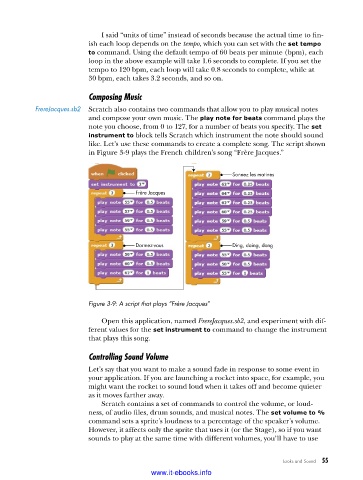
           FrereJacques .sb2  Scratch also contains two commands that allow you to play musical notes
                          and compose your own music. The play note for beats command plays the
                          note you choose, from 0 to 127, for a number of beats you specify. The set
                          instrument to block tells Scratch which instrument the note should sound
                          like. Let’s use these commands to create a complete song. The script shown
                          in Figure 3-9 plays the French children’s song “Frère Jacques.”


                                                                  Sonnez les matines

                                       Frère Jacques


                                       Dormez-vous                Ding, daing, dong


                          Figure 3-9: A script that plays “Frère Jacques”

                             Open this application, named FrereJacques.sb2, and experiment with dif-
                          ferent values for the set instrument to command to change the instrument
                          that plays this song.

                          Controlling Sound Volume
                          Let’s say that you want to make a sound fade in response to some event in
                          your application. If you are launching a rocket into space, for example, you
                          might want the rocket to sound loud when it takes off and become quieter
                          as it moves farther away.
                             Scratch contains a set of commands to control the volume, or loud-
                          ness, of audio files, drum sounds, and musical notes. The set volume to %
                          command sets a sprite’s loudness to a percentage of the speaker’s volume.
                          However, it affects only the sprite that uses it (or the Stage), so if you want
                          sounds to play at the same time with different volumes, you’ll have to use


                                                                                Looks and Sound   55

                                           www.it-ebooks.info

