


Page 76 - Learn To Program With Scratch
P. 76
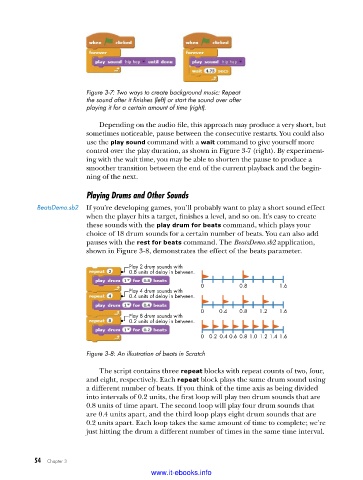
Figure 3-7: Two ways to create background music: Repeat
                         the sound after it finishes (left) or start the sound over after
                         playing it for a certain amount of time (right) .

                             Depending on the audio file, this approach may produce a very short, but
                         sometimes noticeable, pause between the consecutive restarts. You could also
                         use the play sound command with a wait command to give yourself more
                         control over the play duration, as shown in Figure 3-7 (right). By experiment-
                         ing with the wait time, you may be able to shorten the pause to produce a
                         smoother transition between the end of the current playback and the begin-
                         ning of the next.

                         Playing Drums and Other Sounds
           BeatsDemo .sb2  If you’re developing games, you’ll probably want to play a short sound effect
                         when the player hits a target, finishes a level, and so on. It’s easy to create
                         these sounds with the play drum for beats command, which plays your
                         choice of 18 drum sounds for a certain number of beats. You can also add
                         pauses with the rest for beats command. The BeatsDemo.sb2 application,
                         shown in Figure 3-8, demonstrates the effect of the beats parameter.

                                     Play 2 drum sounds with
                                     0.8 units of delay in between.
                                                         0          0.8        1.6
                                     Play 4 drum sounds with
                                     0.4 units of delay in between.
                                                         0    0.4   0.8  1.2   1.6
                                     Play 8 drum sounds with
                                     0.2 units of delay in between.

                                                         0  0.2  0.4 0.6  0.8 1.0  1.2 1.4  1.6

                         Figure 3-8: An illustration of beats in Scratch

                             The script contains three repeat blocks with repeat counts of two, four,
                         and eight, respectively. Each repeat block plays the same drum sound using
                         a different number of beats. If you think of the time axis as being divided
                         into intervals of 0.2 units, the first loop will play two drum sounds that are
                         0.8 units of time apart. The second loop will play four drum sounds that
                         are 0.4 units apart, and the third loop plays eight drum sounds that are
                         0.2 units apart. Each loop takes the same amount of time to complete; we’re
                         just hitting the drum a different number of times in the same time interval.


           54   Chapter 3
                                           www.it-ebooks.info

