


Page 84 - Learn To Program With Scratch
P. 84
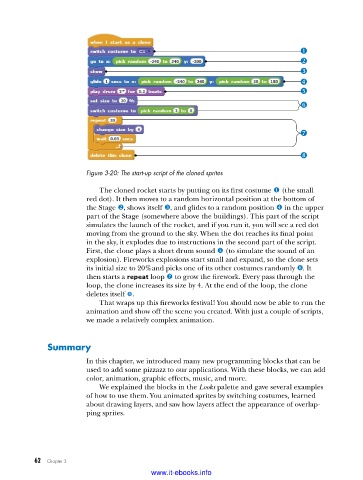
Figure 3-20: The start-up script of the cloned sprites
The cloned rocket starts by putting on its first costume u (the small
red dot). It then moves to a random horizontal position at the bottom of
the Stage v, shows itself w, and glides to a random position x in the upper
part of the Stage (somewhere above the buildings). This part of the script
simulates the launch of the rocket, and if you run it, you will see a red dot
moving from the ground to the sky. When the dot reaches its final point
in the sky, it explodes due to instructions in the second part of the script.
First, the clone plays a short drum sound y (to simulate the sound of an
explosion). Fireworks explosions start small and expand, so the clone sets
its initial size to 20%and picks one of its other costumes randomly z. It
then starts a repeat loop { to grow the firework. Every pass through the
loop, the clone increases its size by 4. At the end of the loop, the clone
deletes itself |.
That wraps up this fireworks festival! You should now be able to run the
animation and show off the scene you created. With just a couple of scripts,
we made a relatively complex animation.
Summary
In this chapter, we introduced many new programming blocks that can be
used to add some pizzazz to our applications. With these blocks, we can add
color, animation, graphic effects, music, and more.
We explained the blocks in the Looks palette and gave several examples
of how to use them. You animated sprites by switching costumes, learned
about drawing layers, and saw how layers affect the appearance of overlap-
ping sprites.
62 Chapter 3
www.it-ebooks.info

