


Page 86 - Learn To Program With Scratch
P. 86
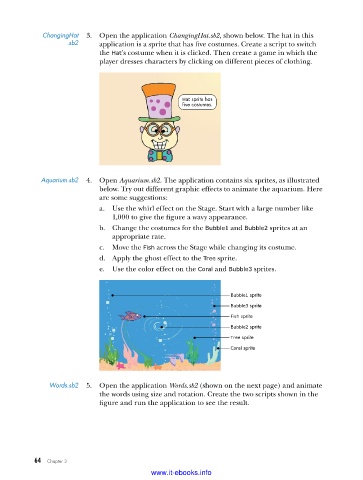
ChangingHat   3.  Open the application ChangingHat.sb2, shown below. The hat in this
                     .sb2    application is a sprite that has five costumes. Create a script to switch
                             the Hat’s costume when it is clicked. Then create a game in which the
                             player dresses characters by clicking on different pieces of clothing.


                                                    Hat sprite has
                                                    five costumes.


            Aquarium .sb2  4.  Open Aquarium.sb2. The application contains six sprites, as illustrated
                             below. Try out different graphic effects to animate the aquarium. Here
                             are some suggestions:
                             a.  Use the whirl effect on the Stage. Start with a large number like
                                1,000 to give the figure a wavy appearance.
                             b.  Change the costumes for the Bubble1 and Bubble2 sprites at an
                                appropriate rate.
                             c.  Move the Fish across the Stage while changing its costume.
                             d.  Apply the ghost effect to the Tree sprite.
                             e.  Use the color effect on the Coral and Bubble3 sprites.


                                                                 Bubble1 sprite
                                                                 Bubble3 sprite
                                                                 Fish sprite
                                                                 Bubble2 sprite
                                                                 Tree sprite
                                                                 Coral sprite


               Words .sb2  5.  Open the application Words.sb2 (shown on the next page) and animate
                             the words using size and rotation. Create the two scripts shown in the
                             figure and run the application to see the result.


           64   Chapter 3
                                           www.it-ebooks.info

