


Page 82 - Learn To Program With Scratch
P. 82
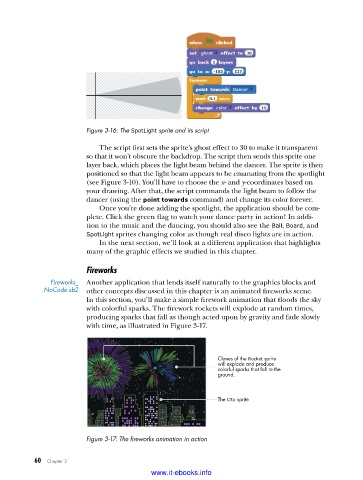
Figure 3-16: The SpotLight sprite and its script

                             The script first sets the sprite’s ghost effect to 30 to make it transparent
                         so that it won’t obscure the backdrop. The script then sends this sprite one
                         layer back, which places the light beam behind the dancer. The sprite is then
                         positioned so that the light beam appears to be emanating from the spotlight
                         (see Figure 3-10). You’ll have to choose the x- and y-coordinates based on
                         your drawing. After that, the script commands the light beam to follow the
                         dancer (using the point towards command) and change its color forever.
                             Once you’re done adding the spotlight, the application should be com-
                         plete. Click the green flag to watch your dance party in action! In addi-
                         tion to the music and the dancing, you should also see the Ball, Board, and
                         SpotLight sprites changing color as though real disco lights are in action.
                             In the next section, we’ll look at a different application that highlights
                         many of the graphic effects we studied in this chapter.

                         Fireworks
               Fireworks_   Another application that lends itself naturally to the graphics blocks and
             NoCode .sb2  other concepts discussed in this chapter is an animated fireworks scene.
                         In this section, you’ll make a simple firework animation that floods the sky
                         with colorful sparks. The firework rockets will explode at random times,
                         producing sparks that fall as though acted upon by gravity and fade slowly
                         with time, as illustrated in Figure 3-17.


                                                              Clones of the Rocket sprite
                                                              will explode and produce
                                                              colorful sparks that fall to the
                                                              ground.


                                                              The City sprite


                         Figure 3-17: The fireworks animation in action


           60   Chapter 3
                                           www.it-ebooks.info

