


Page 85 - Learn To Program With Scratch
P. 85
We then covered the commands in the Sound palette and explained
                          how to play audio files, drum sounds, and musical notes. You created a
                          complete dance scene with commands from both the Looks and the Sound
                          palettes, and you finished with a bang by making a fireworks animation
                          application.
                             In the next chapter, you’ll learn how to coordinate the work among
                          different sprites using message broadcasting and receiving. You’ll also
                          learn how to break up a large program into smaller and more manageable
                          pieces, called procedures. This concept is the key to writing more complex
                          applications.


               Problems

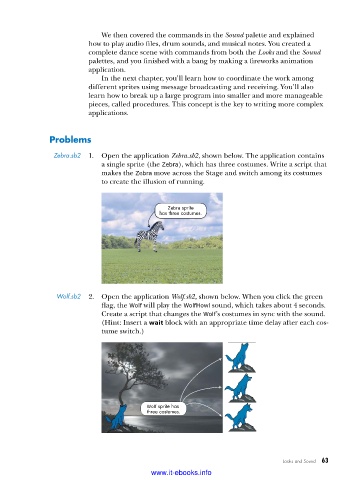
                Zebra .sb2  1.  Open the application Zebra.sb2, shown below. The application contains
                             a single sprite (the Zebra), which has three costumes. Write a script that
                             makes the Zebra move across the Stage and switch among its costumes
                             to create the illusion of running.


                                                Zebra sprite
                                             has three costumes.


                 Wolf .sb2  2.  Open the application Wolf.sb2, shown below. When you click the green
                             flag, the Wolf will play the WolfHowl sound, which takes about 4 seconds.
                             Create a script that changes the Wolf’s costumes in sync with the sound.
                             (Hint: Insert a wait block with an appropriate time delay after each cos-
                             tume switch.)


                                          Wolf sprite has
                                          three costumes.


                                                                                Looks and Sound   63

                                           www.it-ebooks.info

