


Page 90 - Learn To Program With Scratch
P. 90
Most of the applications we’ve developed so far contain only one sprite,
                         but most applications require multiple sprites that work together. An ani-
                         mated story, for example, might have several characters as well as different
                         backgrounds. We need a way to synchronize the sprites’ assigned jobs.
                             In this chapter, we’ll use Scratch’s message-broadcasting mechanism to
                         coordinate work among several sprites (this was the only way to implement
                         procedures in the previous version of Scratch). We’ll then discuss how to use
                         Scratch 2’s “custom blocks” feature to structure large programs as smaller,
                         more manageable pieces called procedures. A procedure is a sequence of
                         commands that performs a specific function. For example, we can create
                         procedures that cause sprites to draw shapes, perform complex computa-
                         tions, process user input, sequence musical notes, manage games, and do
                         many other things. Once created, these procedures can serve as building
                         blocks for constructing all sorts of useful applications.


              message broadcasting and receiving

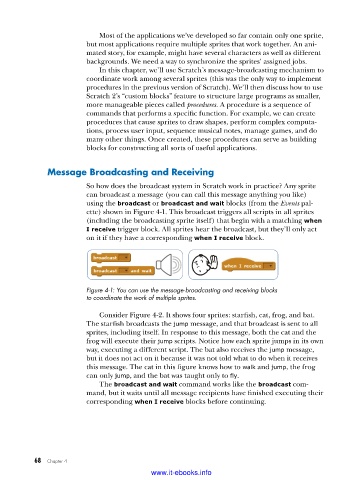
                         So how does the broadcast system in Scratch work in practice? Any sprite
                         can broadcast a message (you can call this message anything you like)
                         using the broadcast or broadcast and wait blocks (from the Events pal-
                         ette) shown in Figure 4-1. This broadcast triggers all scripts in all sprites
                         (including the broadcasting sprite itself) that begin with a matching when
                         I receive trigger block. All sprites hear the broadcast, but they’ll only act
                         on it if they have a corresponding when I receive block.


                         Figure 4-1: You can use the message-broadcasting and receiving blocks
                         to coordinate the work of multiple sprites .

                             Consider Figure 4-2. It shows four sprites: starfish, cat, frog, and bat.
                         The starfish broadcasts the jump message, and that broadcast is sent to all
                         sprites, including itself. In response to this message, both the cat and the
                         frog will execute their jump scripts. Notice how each sprite jumps in its own
                         way, executing a different script. The bat also receives the jump message,
                         but it does not act on it because it was not told what to do when it receives
                         this message. The cat in this figure knows how to walk and jump, the frog
                         can only jump, and the bat was taught only to fly.
                             The broadcast and wait command works like the broadcast com-
                         mand, but it waits until all message recipients have finished executing their
                         corresponding when I receive blocks before continuing.


           68   Chapter 4
                                           www.it-ebooks.info

