


Page 93 - Learn To Program With Scratch
P. 93
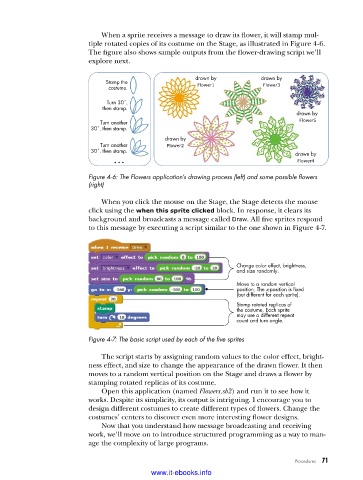
When a sprite receives a message to draw its flower, it will stamp mul-
                          tiple rotated copies of its costume on the Stage, as illustrated in Figure 4-6.
                          The figure also shows sample outputs from the flower-drawing script we’ll
                          explore next.

                                                       drawn by           drawn by
                              Stamp the                 Flower1           Flower3
                               costume.
                               Turn 30˚,
                             then stamp.
                                                                                   drawn by
                             Turn another                                           Flower5
                          30˚, then stamp.
                                               drawn by
                             Turn another      Flower2
                          30˚, then stamp.                                         drawn by
                                 ...                                                Flower4

                          Figure 4-6: The Flowers application’s drawing process (left) and some possible flowers
                          (right)

                             When you click the mouse on the Stage, the Stage detects the mouse
                          click using the when this sprite clicked block. In response, it clears its
                          background and broadcasts a message called Draw. All five sprites respond
                          to this message by executing a script similar to the one shown in Figure 4-7.


                                                                   Change color effect, brightness,
                                                                   and size randomly.
                                                                   Move to a random vertical
                                                                   position. The x-position is fixed
                                                                   (but different for each sprite).
                                                                   Stamp rotated replicas of
                                                                   the costume. Each sprite
                                                                   may use a different repeat
                                                                   count and turn angle.

                          Figure 4-7: The basic script used by each of the five sprites

                             The script starts by assigning random values to the color effect, bright-
                          ness effect, and size to change the appearance of the drawn flower. It then
                          moves to a random vertical position on the Stage and draws a flower by
                          stamping rotated replicas of its costume.
                             Open this application (named Flowers.sb2) and run it to see how it
                          works. Despite its simplicity, its output is intriguing. I encourage you to
                          design different costumes to create different types of flowers. Change the
                          costumes’ centers to discover even more interesting flower designs.
                             Now that you understand how message broadcasting and receiving
                          work, we’ll move on to introduce structured programming as a way to man-
                          age the complexity of large programs.

                                                                                   Procedures   71

                                           www.it-ebooks.info

