


Page 182 - Scratch Programming Playground
P. 182
In the orange Data category, click the Make a List button
                         to make a second list for Fruit Slicer. Name the list slice y and
                         make it For this sprite only.
                             then click Make a Variable, create a variable named i,
                         and make it For this sprite only. You’ll use this i variable in
                         the next step. the Slice sprite will use the two lists and i vari-
                         able to draw the light blue trail.

                         5. Record the Mouse Movements

                         You’ll use the Pen blocks to draw lines for the slice. But first
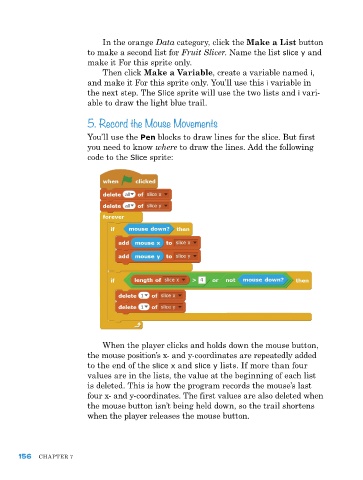
                         you need to know where to draw the lines. add the following
                         code to the Slice sprite:


                             When the player clicks and holds down the mouse button,
                         the mouse position’s x- and y-coordinates are repeatedly added
                         to the end of the slice x and slice y lists. If more than four
                         values are in the lists, the value at the beginning of each list
                         is deleted. this is how the program records the mouse’s last
                         four x- and y-coordinates. the first values are also deleted when
                         the mouse button isn’t being held down, so the trail shortens
                         when the player releases the mouse button.


      156   Chapter 7

