


Page 183 - Scratch Programming Playground
P. 183
this script provides the proper coordinates for the slice x
            and slice y lists. the next script will actually draw the slice
            trail.

            6. Make a Custom Block to Draw the Slice

            Select the purple More Blocks category and click the Make
            a Block button to open the New Block window. the purple
            blocks are custom Scratch blocks that you create.
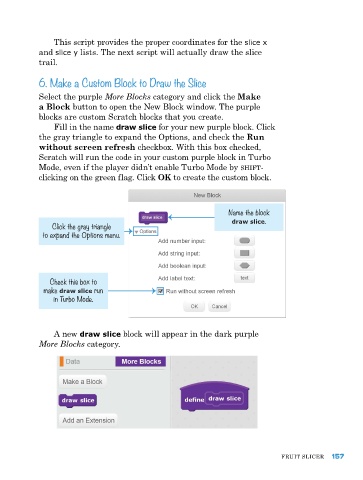
                Fill in the name draw slice for your new purple block. Click
            the gray triangle to expand the Options, and check the Run
            without screen refresh checkbox. With this box checked,
            Scratch will run the code in your custom purple block in turbo
            Mode, even if the player didn’t enable turbo Mode by shift-
            clicking on the green flag. Click OK to create the custom block.


                                                                Name the block
                                                                 draw slice.
               Click the gray triangle
             to expand the Options menu.


               Check this box to
             make draw slice run
                in Turbo Mode.


                a new draw slice block will appear in the dark purple
            More Blocks category.


                                                                               FruIt SlICer  157

