


Page 184 - Scratch Programming Playground
P. 184
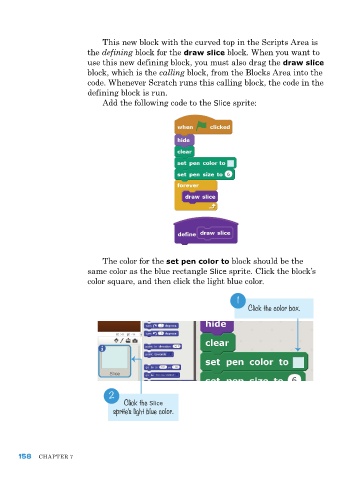
this new block with the curved top in the Scripts area is
                         the defining block for the draw slice block. When you want to
                         use this new defining block, you must also drag the draw slice
                         block, which is the calling block, from the Blocks area into the
                         code. Whenever Scratch runs this calling block, the code in the
                         defining block is run.
                              add the following code to the Slice sprite:


                             the color for the set pen color to block should be the
                         same color as the blue rectangle Slice sprite. Click the block’s
                         color square, and then click the light blue color.

                                                                   1
                                                                      Click the color box.


                               2
                                   Click the Slice
                                sprite’s light blue color.


      158   Chapter 7

