


Page 152 - Basic Course
P. 152
KNX BASIC COURSE


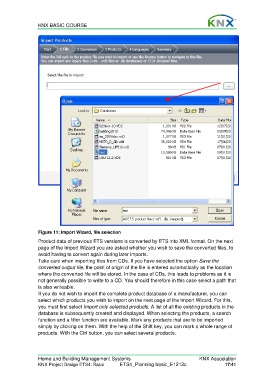
                  Figure 11: Import Wizard, file selection
                  Product data of previous ETS versions is converted by ETS into XML format. On the next
                  page of the Import Wizard you are asked whether you wish to save the converted files, to
                  avoid having to convert again during later imports.
                  Take care when importing files from CDs. If you have selected the option Save the
                  converted output file, the point of origin of the file is entered automatically as the location
                  where the converted file will be stored. In the case of CDs, this leads to problems as it is
                  not generally possible to write to a CD. You should therefore in this case select a path that
                  is also writeable.
                  If you do not wish to import the complete product database of a manufacturer, you can
                  select which products you wish to import on the next page of the Import Wizard. For this,
                  you must first select Import only selected products. A list of all the existing products in the
                  database is subsequently created and displayed. When selecting the products, a search
                  function and a filter function are available. Mark any products that are to be imported
                  simply by clicking on them. With the help of the Shift key, you can mark a whole range of
                  products. With the Ctrl button, you can select several products.


                  Home and Building Management Systems                                    KNX Association
                  KNX Project Design ETS4: Basic      ETS4_Planning basic_E1212c                     17/41

