


Page 149 - Basic Course
P. 149
KNX BASIC COURSE
A further function under the Database tab makes it possible to store the database not
on the local computer but e.g. on a network drive. This is especially useful, when
working with several users in one database. However, only one user can work with the
database at one time. If required, you must select the option Use central database
repository and when you wish to work with this database, you must check out this
database to avoid that some else simultaneously carries out changes to the database
content. Once you have finished editing the database, you must check this database
back into the central database repository again. A prerequisite for this procedure is
that the database in question has only been added once to the central database
repository. The path of the central database repository can also be entered in this
window.
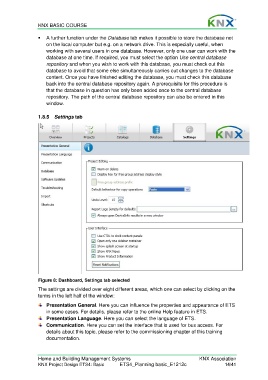
1.8.5 Settings tab
Figure 8: Dashboard, Settings tab selected
The settings are divided over eight different areas, which one can select by clicking on the
terms in the left half of the window:
Presentation General. Here you can influence the properties and appearance of ETS
in some cases. For details, please refer to the online Help feature in ETS.
Presentation Language. Here you can select the language of ETS.
Communication. Here you can set the interface that is used for bus access. For
details about this topic, please refer to the commissioning chapter of this training
documentation.
Home and Building Management Systems KNX Association
KNX Project Design ETS4: Basic ETS4_Planning basic_E1212c 14/41

