


Page 155 - Basic Course
P. 155
KNX BASIC COURSE

                  2  Opening a project with ETS


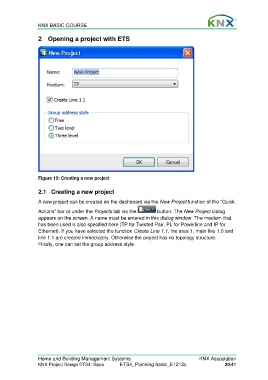
                  Figure 13: Creating a new project

                  2.1  Creating a new project

                  A new project can be created on the dashboard via the New Project function of the “Quick

                  Actions” bar or under the Projects tab via the       button. The New Project dialog
                  appears on the screen. A name must be entered in this dialog window. The medium that
                  has been used is also specified here (TP for Twisted Pair, PL for Powerline and IP for
                  Ethernet). If you have selected the function Create Line 1.1, the area 1, main line 1.0 and
                  line 1.1 are created immediately. Otherwise the project has no topology structure.
                  Finally, one can set the group address style.


                  Home and Building Management Systems                                    KNX Association
                  KNX Project Design ETS4: Basic      ETS4_Planning basic_E1212c                     20/41

