


Page 151 - Basic Course
P. 151
KNX BASIC COURSE


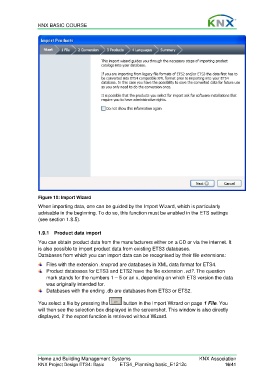
                  Figure 10: Import Wizard
                  When importing data, one can be guided by the Import Wizard, which is particularly
                  advisable in the beginning. To do so, this function must be enabled in the ETS settings
                  (see section 1.8.5).


                  1.9.1  Product data import
                  You can obtain product data from the manufacturers either on a CD or via the internet. It
                  is also possible to import product data from existing ETS3 databases.
                  Databases from which you can import data can be recognised by their file extensions:
                      Files with the extension .knxprod are databases in XML data format for ETS4.
                      Product databases for ETS3 and ETS2 have the file extension .vd?. The question
                      mark stands for the numbers 1 – 5 or an x, depending on which ETS version the data
                      was originally intended for.
                      Databases with the ending .db are databases from ETS3 or ETS2.

                  You select a file by pressing the     button in the Import Wizard on page 1 File. You
                  will then see the selection box displayed in the screenshot. This window is also directly
                  displayed, if the export function is retrieved without Wizard.


                  Home and Building Management Systems                                    KNX Association
                  KNX Project Design ETS4: Basic      ETS4_Planning basic_E1212c                     16/41

