


Page 150 - Basic Course
P. 150
KNX BASIC COURSE

                      Database


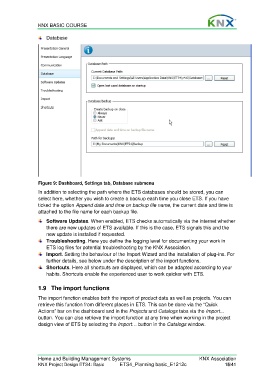
                  Figure 9: Dashboard, Settings tab, Database submenu
                  In addition to selecting the path where the ETS databases should be stored, you can
                  select here, whether you wish to create a backup each time you close ETS. If you have
                  ticked the option Append date and time on backup file name, the current date and time is
                  attached to the file name for each backup file.
                      Software Updates. When enabled, ETS checks automatically via the internet whether
                      there are new updates of ETS available. If this is the case, ETS signals this and the
                      new update is installed if requested.
                      Troubleshooting. Here you define the logging level for documenting your work in
                      ETS log files for potential troubleshooting by the KNX Association.
                      Import. Setting the behaviour of the Import Wizard and the installation of plug-ins. For
                      further details, see below under the description of the import functions.
                      Shortcuts. Here all shortcuts are displayed, which can be adapted according to your
                      habits. Shortcuts enable the experienced user to work quicker with ETS.


                  1.9  The import functions

                  The import function enables both the import of product data as well as projects. You can
                  retrieve this function from different places in ETS. This can be done via the “Quick
                  Actions” bar on the dashboard and in the Projects and Catalogs tabs via the Import...
                  button. You can also retrieve the import function at any time when working in the project
                  design view of ETS by selecting the Import… button in the Catalogs window.


                  Home and Building Management Systems                                    KNX Association
                  KNX Project Design ETS4: Basic      ETS4_Planning basic_E1212c                     15/41

