


Page 153 - Basic Course
P. 153
KNX BASIC COURSE


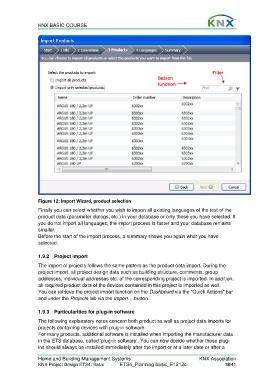
                                                                                               Filter
                                                                       Search
                                                                       function


                  Figure 12: Import Wizard, product selection
                  Finally you can select whether you wish to import all existing languages of the text of the
                  product data (parameter dialogs, etc.) in your database or only those you have selected. If
                  you do not import all languages, the import process is faster and your database remains
                  smaller.
                  Before the start of the import process, a summary shows you again what you have
                  selected.


                  1.9.2 Project import

                  The import of projects follows the same pattern as the product data import. During the
                  project import, all project design data such as building structure, comments, group
                  addresses, individual addresses etc. of the corresponding project is imported. In addition,
                  all required product data of the devices contained in this project is imported as well.
                  You can retrieve the project import function on the Dashboard via the “Quick Actions” bar
                  and under the Projects tab via the Import….button.


                  1.9.3  Particularities for plug-in software
                  The following explanatory notes concern both product as well as project data imports for
                  projects containing devices with plug-in software.
                  For many products, additional software is installed when importing the manufacturer data
                  in the ETS database, called ‘plug-in software’. You can now decide whether these plug-
                  ins should always be installed immediately after the import or at a later date or after a

                  Home and Building Management Systems                                    KNX Association
                  KNX Project Design ETS4: Basic      ETS4_Planning basic_E1212c                     18/41

