


Page 169 - Basic Course
P. 169
KNX BASIC COURSE

                  Here you can find information about the application of the device. It is also possible to
                  change the application of a device in this container. There is also an index card with
                  catalog information about the respective product.


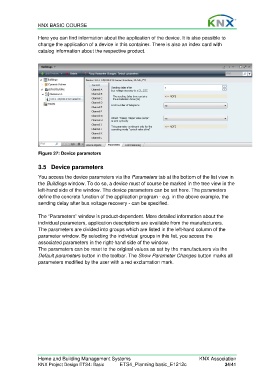
                  Figure 27: Device parameters

                  3.5 Device parameters

                  You access the device parameters via the Parameters tab at the bottom of the list view in
                  the Buildings window. To do so, a device must of course be marked in the tree view in the
                  left-hand side of the window. The device parameters can be set here. The parameters
                  define the concrete function of the application program - e.g. in the above example, the
                  sending delay after bus voltage recovery - can be specified.

                  The “Parameters” window is product-dependent. More detailed information about the
                  individual parameters, application descriptions are available from the manufacturers.
                  The parameters are divided into groups which are listed in the left-hand column of the
                  parameter window. By selecting the individual groups in this list, you access the
                  associated parameters in the right-hand side of the window.
                  The parameters can be reset to the original values as set by the manufacturers via the
                  Default parameters button in the toolbar. The Show Parameter Changes button marks all
                  parameters modified by the user with a red exclamation mark.


                  Home and Building Management Systems                                    KNX Association
                  KNX Project Design ETS4: Basic      ETS4_Planning basic_E1212c                     34/41

