


Page 164 - Basic Course
P. 164
KNX BASIC COURSE

                  3  Quick project design with ETS


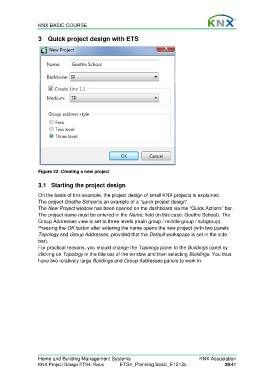
                  Figure 22: Creating a new project

                  3.1  Starting the project design

                  On the basis of this example, the project design of small KNX projects is explained.
                  The project Goethe School is an example of a “quick project design”.
                  The New Project window has been opened on the dashboard via the “Quick Actions” bar.
                  The project name must be entered in the Name: field (in this case: Goethe School). The
                  Group Addresses view is set to three levels (main group / middle group / subgroup).
                  Pressing the OK button after entering the name opens the new project (with two panels
                  Topology and Group Addresses, provided that the Default workspace is set in the side
                  bar).
                  For practical reasons, you should change the Topology panel to the Buildings panel by
                  clicking on Topology in the title bar of the window and then selecting Buildings. You thus
                  have two relatively large Buildings and Group Addresses panels to work in.


                  Home and Building Management Systems                                    KNX Association
                  KNX Project Design ETS4: Basic      ETS4_Planning basic_E1212c                     29/41

