


Page 166 - Basic Course
P. 166
KNX BASIC COURSE


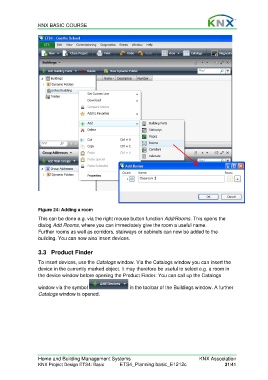
                  Figure 24: Adding a room

                  This can be done e.g. via the right mouse button function Add/Rooms. This opens the
                  dialog Add Rooms, where you can immediately give the room a useful name.
                  Further rooms as well as corridors, stairways or cabinets can now be added to the
                  building. You can now also insert devices.


                  3.3 Product Finder

                  To insert devices, use the Catalogs window. Via the Catalogs window you can insert the
                  device in the currently marked object. It may therefore be useful to select e.g. a room in
                  the device window before opening the Product Finder. You can call up the Catalogs

                  window via the symbol                    in the toolbar of the Buildings window. A further
                  Catalogs window is opened.


                  Home and Building Management Systems                                    KNX Association
                  KNX Project Design ETS4: Basic      ETS4_Planning basic_E1212c                     31/41

