


Page 165 - Basic Course
P. 165
KNX BASIC COURSE


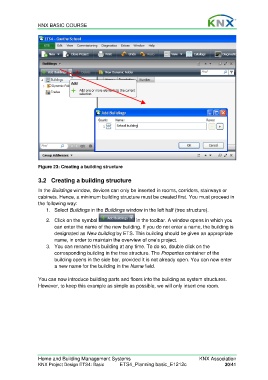
                  Figure 23: Creating a building structure

                  3.2  Creating a building structure

                  In the Buildings window, devices can only be inserted in rooms, corridors, stairways or
                  cabinets. Hence, a minimum building structure must be created first. You must proceed in
                  the following way:
                      1. Select Buildings in the Buildings window in the left half (tree structure).

                      2.  Click on the symbol                 in the toolbar. A window opens in which you
                         can enter the name of the new building. If you do not enter a name, the building is
                         designated as New building by ETS. This building should be given an appropriate
                         name, in order to maintain the overview of one’s project.
                      3.  You can rename this building at any time. To do so, double click on the
                         corresponding building in the tree structure. The Properties container of the
                         building opens in the side bar, provided it is not already open. You can now enter
                         a new name for the building in the Name field.

                  You can now introduce building parts and floors into the building as system structures.
                  However, to keep this example as simple as possible, we will only insert one room.


                  Home and Building Management Systems                                    KNX Association
                  KNX Project Design ETS4: Basic      ETS4_Planning basic_E1212c                     30/41

