


Page 168 - Basic Course
P. 168
KNX BASIC COURSE


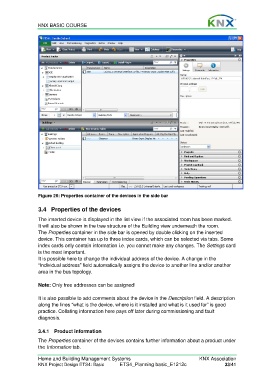
                  Figure 26: Properties container of the devices in the side bar

                  3.4  Properties of the devices

                  The inserted device is displayed in the list view if the associated room has been marked.
                  It will also be shown in the tree structure of the Building view underneath the room.
                  The Properties container in the side bar is opened by double clicking on the inserted
                  device. This container has up to three index cards, which can be selected via tabs. Some
                  index cards only contain information i.e. you cannot make any changes. The Settings card
                  is the most important.
                  It is possible here to change the individual address of the device. A change in the
                  “Individual address” field automatically assigns the device to another line and/or another
                  area in the bus topology.

                  Note: Only free addresses can be assigned!

                  It is also possible to add comments about the device in the Description field. A description
                  along the lines “what is the device, where is it installed and what is it used for” is good
                  practice. Collating information here pays off later during commissioning and fault
                  diagnosis.


                  3.4.1 Product information

                  The Properties container of the devices contains further information about a product under
                  the Information tab.

                  Home and Building Management Systems                                    KNX Association
                  KNX Project Design ETS4: Basic      ETS4_Planning basic_E1212c                     33/41

