


Page 167 - Basic Course
P. 167
KNX BASIC COURSE


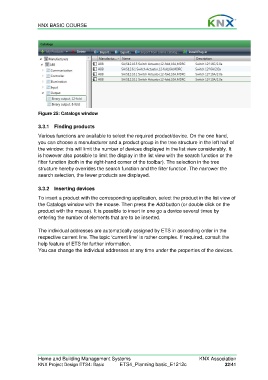
                  Figure 25: Catalogs window

                  3.3.1 Finding products

                  Various functions are available to select the required product/device. On the one hand,
                  you can choose a manufacturer and a product group in the tree structure in the left half of
                  the window: this will limit the number of devices displayed in the list view considerably. It
                  is however also possible to limit the display in the list view with the search function or the
                  filter function (both in the right-hand corner of the toolbar). The selection in the tree
                  structure hereby overrides the search function and the filter function. The narrower the
                  search selection, the fewer products are displayed.


                  3.3.2 Inserting devices
                  To insert a product with the corresponding application, select the product in the list view of
                  the Catalogs window with the mouse. Then press the Add button (or double click on the
                  product with the mouse). It is possible to insert in one go a device several times by
                  entering the number of elements that are to be inserted.

                  The individual addresses are automatically assigned by ETS in ascending order in the
                  respective current line. The topic ‘current line’ is rather complex. If required, consult the
                  help feature of ETS for further information.
                  You can change the individual addresses at any time under the properties of the devices.


                  Home and Building Management Systems                                    KNX Association
                  KNX Project Design ETS4: Basic      ETS4_Planning basic_E1212c                     32/41

