


Page 181 - Basic Course
P. 181
KNX BASIC COURSE

                  The same project can look completely different when using different workspaces. A
                  project designer needs different information compared to someone who is merely doing
                  commissioning. The concept of workspaces takes these differences into account.


                  2.1  Which properties of the screen elements are stored in a
                        workspace?

                      All open windows e.g. Topology, Group Addresses, Building View
                      The position and size of these windows
                      The internal columns and structure of areas
                      The visible columns and their layout (sequence)

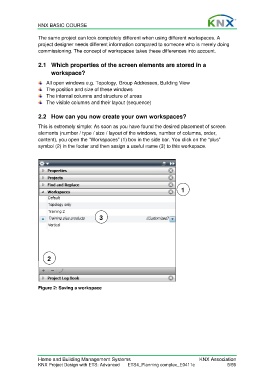
                  2.2  How can you now create your own workspaces?

                  This is extremely simple: As soon as you have found the desired placement of screen
                  elements (number / type / size / layout of the windows, number of columns, order,
                  content), you open the “Workspaces” (1) box in the side bar. You click on the “plus”
                  symbol (2) in the footer and then assign a useful name (3) to this workspace.


                                                                                 1


                                             3


                      2


                  Figure 2: Saving a workspace


                  Home and Building Management Systems                                    KNX Association
                  KNX Project Design with ETS: Advanced   ETS4_Planning complex_E0411c                5/59

