


Page 183 - Basic Course
P. 183
KNX BASIC COURSE

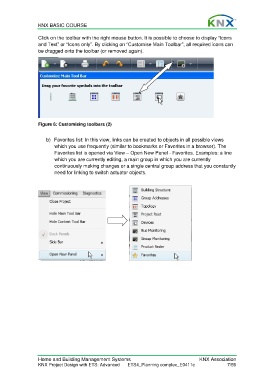
                  Click on the toolbar with the right mouse button. It is possible to choose to display “Icons
                  and Text” or “Icons only”. By clicking on “Customise Main Toolbar”, all required icons can
                  be dragged onto the toolbar (or removed again).


                  Figure 6: Customising toolbars (2)

                      b)  Favorites list: In this view, links can be created to objects in all possible views
                         which you use frequently (similar to bookmarks or Favorites in a browser). The
                         Favorites list is opened via View – Open New Panel - Favorites. Examples: a line
                         which you are currently editing, a main group in which you are currently
                         continuously making changes or a single central group address that you constantly
                         need for linking to switch actuator objects.


                  Home and Building Management Systems                                    KNX Association
                  KNX Project Design with ETS: Advanced   ETS4_Planning complex_E0411c                7/59

