


Page 184 - Basic Course
P. 184
KNX BASIC COURSE


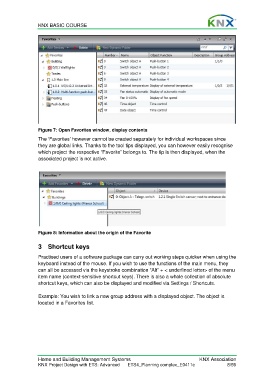
                  Figure 7: Open Favorites window, display contents

                  The ‘Favorites’ however cannot be created separately for individual workspaces since
                  they are global links. Thanks to the tool tips displayed, you can however easily recognise
                  which project the respective “Favorite” belongs to. The tip is then displayed, when the
                  associated project is not active.


                  Figure 8: Information about the origin of the Favorite

                  3 Shortcut keys

                  Practised users of a software package can carry out working steps quicker when using the
                  keyboard instead of the mouse. If you wish to use the functions of the main menu, they
                  can all be accessed via the keystroke combination “Alt” + < underlined letter> of the menu
                  item name (context-sensitive shortcut keys). There is also a whole collection of absolute
                  shortcut keys, which can also be displayed and modified via Settings / Shortcuts.

                  Example: You wish to link a new group address with a displayed object. The object is
                  located in a Favorites list.


                  Home and Building Management Systems                                    KNX Association
                  KNX Project Design with ETS: Advanced   ETS4_Planning complex_E0411c                8/59

