


Page 188 - Basic Course
P. 188
KNX BASIC COURSE


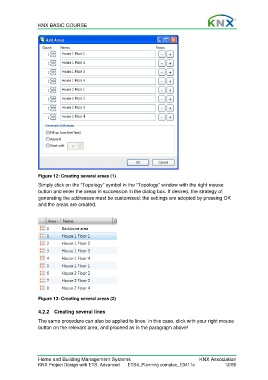
                  Figure 12: Creating several areas (1)
                  Simply click on the “Topology” symbol in the “Topology” window with the right mouse
                  button and enter the areas in succession in the dialog box. If desired, the strategy of
                  generating the addresses must be customised; the settings are adopted by pressing OK
                  and the areas are created.


                  Figure 13: Creating several areas (2)


                  4.2.2  Creating several lines
                  The same procedure can also be applied to lines. In this case, click with your right mouse
                  button on the relevant area, and proceed as in the paragraph above!


                  Home and Building Management Systems                                    KNX Association
                  KNX Project Design with ETS: Advanced   ETS4_Planning complex_E0411c               12/59

