


Page 209 - Basic Course
P. 209
KNX BASIC COURSE
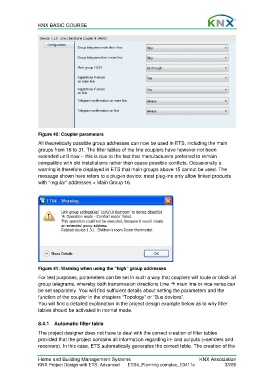
Figure 40: Coupler parameters
All theoretically possible group addresses can now be used in ETS, including the main
groups from 16 to 31. The filter tables of the line couplers have however not been
extended until now – this is due to the fact that manufacturers preferred to remain
compatible with old installations rather than cause possible conflicts. Occasionally a
warning is therefore displayed in ETS that main groups above 15 cannot be used. The
message shown here refers to a plug-in device; most plug-ins only allow linked products
with “regular” addresses < Main Group 16.
Figure 41: Warning when using the “high” group addresses
For test purposes, parameters can be set in such a way that couplers will route or block all
group telegrams, whereby both transmission directions Line main line or vice versa can
be set separately. You will find sufficient details about setting the parameters and the
function of the coupler in the chapters “Topology” or “Bus devices”.
You will find a detailed explanation in the project design example below as to why filter
tables should be activated in normal mode.
8.4.1 Automatic filter table
The project designer does not have to deal with the correct creation of filter tables
provided that the project contains all information regarding in- and outputs (=senders and
receivers). In this case, ETS automatically generates the correct table. The creation of the
Home and Building Management Systems KNX Association
KNX Project Design with ETS: Advanced ETS4_Planning complex_E0411c 33/59

