


Page 210 - Basic Course
P. 210
KNX BASIC COURSE

                  table starts with the download of the coupler. That is why filter tables are not displayed,
                  but are loaded straight away in the coupler.

                  8.4.2  Manually created addresses in the filter table:
                  Nevertheless, there are cases, in which the tables cannot be generated correctly because
                  of the fact that devices receive or send telegrams, whose parameters cannot be set in
                  ETS, for instance gateways or visualisation programs. In this case, a solution is needed to
                  correctly set the filter tables, just for these addresses.

                  There are two options available:

                             a)  Manual configuration of the filter table
                             b)  Use of a dummy application

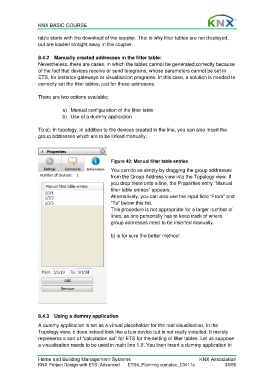
                  To a): In topology, in addition to the devices created in the line, you can also insert the
                  group addresses which are to be linked manually.


                                                  Figure 42: Manual filter table entries
                                                  You can do so simply by dragging the group addresses
                                                  from the Group Address view into the Topology view. If
                                                  you drop them onto a line, the Properties entry “Manual
                                                  filter table entries” appears.
                                                  Alternatively, you can also use the input field “From” and
                                                  “To” below this list.
                                                  This procedure is not appropriate for a larger number of
                                                  lines, as one personally has to keep track of where
                                                  group addresses need to be inserted manually.

                                                  b) is for sure the better method:


                  8.4.3  Using a dummy application
                  A dummy application is set as a virtual placeholder for the real visualisation. In the
                  Topology view, it does indeed look like a bus device but is not really installed. It merely
                  represents a sort of “calculation aid” for ETS for the setting of filter tables. Let us suppose
                  a visualisation needs to be used in main line 1.0. You then insert a dummy application in


                  Home and Building Management Systems                                    KNX Association
                  KNX Project Design with ETS: Advanced   ETS4_Planning complex_E0411c               34/59

