


Page 264 - Basic Course
P. 264
KNX BASIC COURSE

                  2.2  Checking if an address exists and locating the device


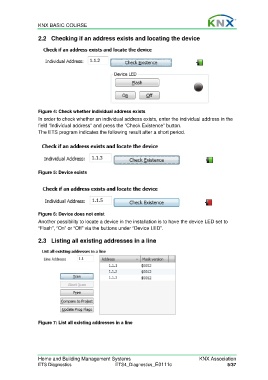
                  Figure 4: Check whether individual address exists
                  In order to check whether an individual address exists, enter the individual address in the
                  field “Individual address” and press the “Check Existence” button.
                  The ETS program indicates the following result after a short period.


                  Figure 5: Device exists


                  Figure 6: Device does not exist

                  Another possibility to locate a device in the installation is to have the device LED set to
                  “Flash”, “On” or “Off” via the buttons under “Device LED”.


                  2.3  Listing all existing addresses in a line


                  Figure 7: List all existing addresses in a line


                  Home and Building Management Systems                                    KNX Association
                  ETS Diagnostics                   ETS4_Diagnostics_E0111c                           5/37

