


Page 251 - Advanced Course
P. 251
KNX ADVANCED COURSE


                  5.1.8  Linking Group Addresses – Partition Wall (Filter)

                  Two small meeting rooms should be separated by folding doors so that they can be
                  combined into a larger room. When the partition is closed, it must be possible to switch
                  and dim the lighting separately in the rooms. If the partition is open, the switch sensors at
                  the doors should control all the lighting in the respective areas of the room.


                     Partition       Push button 1 switches/dims        Push button 2 switches/dims

                      closed                     L 1                                L 2

                       open                    L1 + L2                            L 1 + L 2

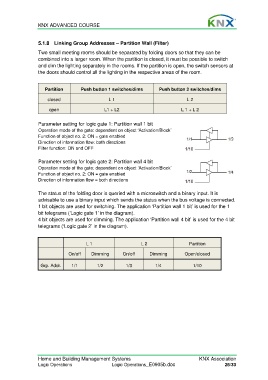
                  Parameter setting for logic gate 1: Partition wall 1 bit
                  Operation mode of the gate: dependent on object ‘Activation/Block’
                  Function of object no. 2: ON = gate enabled
                  Direction of information flow: both directions
                  Filter function: ON and OFF

                  Parameter setting for logic gate 2: Partition wall 4 bit
                  Operation mode of the gate: dependent on object ‘Activation/Block’
                  Function of object no. 2: ON = gate enabled
                  Direction of information flow = both directions

                  The status of the folding door is queried with a microswitch and a binary input. It is
                  advisable to use a binary input which sends the status when the bus voltage is connected.
                  1 bit objects are used for switching. The application ‘Partition wall 1 bit’ is used for the 1
                  bit telegrams (‘Logic gate 1’ in the diagram).
                  4 bit objects are used for dimming. The application ‘Partition wall 4 bit’ is used for the 4 bit
                  telegrams (‘Logic gate 2’ in the diagram).


                                       L 1                      L 2                  Partition
                               On/off     Dimming       On/off     Dimming         Open/closed


                   Grp. Addr.    1/1        1/2          1/3          1/4              1/10


                  Home and Building Management Systems                                    KNX Association
                  Logic Operations                 Logic Operations_E0905b.doc                       26/33

