


Page 280 - SK tingkatan 5
P. 280
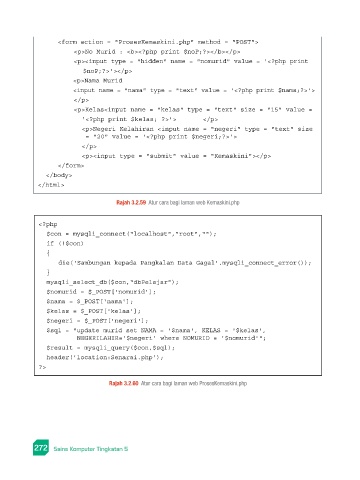
<form action = "ProsesKemaskini.php" method = "POST">
                             <p>No Murid : <b><?php print $noP;?></b></p>
                             <p><input type = "hidden" name = "nomurid" value = '<?php print
                               $noP;?>'></p>
                             <p>Nama Murid
                             <input name = "nama" type = "text" value = '<?php print $nama;?>'>
                             </p>
                             <p>Kelas<input name = "kelas" type = "text" size = "15" value =
                               '<?php print $kelas; ?>'>       </p>
                               <p>Negeri Kelahiran <input name = "negeri" type = "text" size
                                = "20" value = '<?php print $negeri;?>'>
                               </p>
                               <p><input type = "submit" value = "Kemaskini"></p>
                        </form>
                    </body>
                  </html>

                                          Rajah 3.2.59  Atur cara bagi laman web Kemaskini.php


                  <?php
                    $con = mysqli_connect("localhost","root","");
                    if (!$con)
                     {
                        die('Sambungan kepada Pangkalan Data Gagal'.mysqli_connect_error());
                     }
                    mysqli_select_db($con,"dbPelajar");
                    $nomurid = $_POST['nomurid'];
                    $nama = $_POST['nama'];
                    $kelas = $_POST['kelas'];
                    $negeri = $_POST['negeri'];
                    $sql = "update murid set NAMA = '$nama', KELAS = '$kelas',
                              NEGERILAHIR='$negeri' where NOMURID = '$nomurid'";
                    $result = mysqli_query($con,$sql);
                    header('location:Senarai.php');
                  ?>

                                        Rajah 3.2.60  Atur cara bagi laman web ProsesKemaskini.php


                 272   Sains Komputer Tingkatan 5                                                                                                                                                                PB

