


Page 40 - X-Air User's Manual
P. 40
40  X AIR User Manual


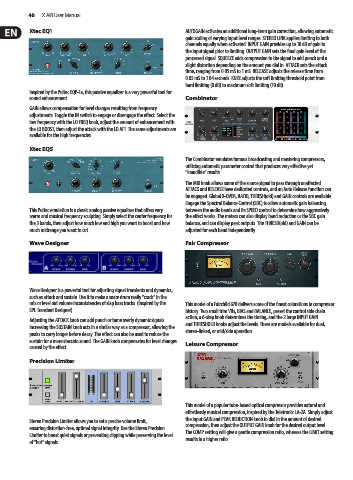
           Xtec EQ1                                            AUTOGAIN activates an additional long-term gain correction, allowing automatic
                                                               gain scaling of varying input level ranges. STEREO LINK applies limiting to both
                                                               channels equally when activated. INPUT GAIN provides up to 18 dB of gain to
                                                               the input signal prior to limiting. OUTPUT GAIN sets the final gain level of the
                                                               processed signal. SQUEEZE adds compression to the signal to add punch and a
                                                               slight distortion depending on the amount you dial in. ATTACK sets the attack
                                                               time, ranging from 0.05 mS to 1 mS. RELEASE adjusts the release time from
                                                               0.05 mS to 1.04 seconds. KNEE adjusts the soft limiting threshold point from
                                                               hard limiting (0 dB) to maximum soft limiting (10 dB).
           Inspired by the Pultec EQP-1a, this passive equalizer is a very powerful tool for
           sound enhancement.                                  Combinator
           GAIN allows compensation for level changes resulting from frequency
           adjustments. Toggle the IN switch to engage or disengage the effect. Select the
           low frequency with the LO FREQ knob, adjust the amount of enhancement with
           the LO BOOST, then adjust the attack with the LO ATT. The same adjustments are
           available for the high frequencies.
           Xtec EQ5

                                                               The Combinator emulates famous broadcasting and mastering compressors,
                                                               utilizing automatic parameter control that produces very effective yet
                                                               “inaudible” results.
                                                               The MIX knob allows some of the source signal to pass through unaffected.
                                                               ATTACK and RELEASE have dedicated controls, and an Auto Release function can
                                                               be engaged. Global X-OVER, RATIO, THRESH(old) and GAIN controls are available.
                                                               Engage the Spectral Balance Control (SBC) to allow automatic gain balancing
           This Pultec emulation is a classic analog passive equalizer that offers very   between the audio bands and its SPEED control to determine how aggressively
           warm and musical frequency sculpting. Simply select the center frequency for   the effect works. The meters can also display band reduction or the SBC gain
           the 3 bands, then adjust how much low and high you want to boost and how   balance, and can display peak outputs. The THRESH(old) and GAIN can be
           much midrange you want to cut.                      adjusted for each band independently.
           Wave Designer                                       Fair Compressor


           Wave Designer is a powerful tool for adjusting signal transients and dynamics,
           such as attack and sustain. Use it to make a snare drum really “crack” in the
           mix or level out volume inconsistencies of slap bass tracks. (Inspired by the   This model of a Fairchild 670 delivers some of the finest colorations in compressor
           SPL Transient Designer)                             history. Two small trim VRs, BIAS and BALANCE, preset the control side chain
                                                               action, a 6-step knob determines the timing, and the 2 large INPUT GAIN
           Adjusting the ATTACK knob can add punch or tame overly dynamic signals.
           Increasing the SUSTAIN knob acts in a similar way as a compressor, allowing the   and THRESHOLD knobs adjust the levels. There are models available for dual,
                                                               stereo-linked, or mid/side operation.
           peaks to carry longer before decay. The effect can also be used to reduce the
           sustain for a more staccato sound. The GAIN knob compensates for level changes
           caused by the effect.                               Leisure Compressor

           Precision Limiter


                                                               This model of a popular tube-based optical compressor provides natural and
                                                               effortlessly musical compression, inspired by the Teletronix LA-2A. Simply adjust
                                                               the input GAIN and PEAK REDUCTION knob to dial in the amount of desired
           Stereo Precision Limiter allows you to set a precise volume limit,
           ensuring distortion-free, optimal signal integrity. Use the Stereo Precision   compression, then adjust the OUTPUT GAIN knob for the desired output level.
                                                               The COMP setting will give a gentle compression ratio, whereas the LIMIT setting
           Limiter to boost quiet signals or preventing clipping while preserving the level   results in a higher ratio.
           of “hot” signals.

