


Page 37 - X-Air User's Manual
P. 37
37   X AIR User Manual


        Stereo Chorus                                       Dimensional Chorus


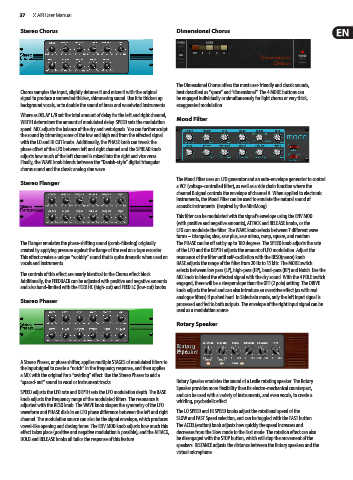
                                                            The Dimensional Chorus offers the most user-friendly and classic sounds,
        Chorus samples the input, slightly detunes it and mixes it with the original   best described as “space” and “dimensional”. The 4 MODE buttons can
        signal to produce a somewhat thicker, shimmering sound. Use it to thicken up   be engaged individually or simultaneously for light chorus or very thick,
        background vocals, or to double the sound of brass and woodwind instruments.  exaggerated modulation.

        Where as DELAY L/R set the total amount of delay for the left and right channel,
        WIDTH determines the amount of modulated delay. SPEED sets the modulation   Mood Filter
        speed. MIX adjusts the balance of the dry and wet signals. You can further sculpt
        the sound by trimming some of the low and high end from the effected signal
        with the LO and HI CUT knobs. Additionally, the PHASE knob can tweak the
        phase offset of the LFO between left and right channel and the SPREAD knob
        adjusts how much of the left channel is mixed into the right and vice versa.
        Finally, the WAVE knob blends between the “Danish-style” digital triangular
        chorus sound and the classic analog sine wave.
                                                            The Mood Filter uses an LFO generator and an auto-envelope generator to control
        Stereo Flanger
                                                            a VCF (voltage-controlled filter), as well as a side chain function where the
                                                            channel B signal controls the envelope of channel A. When applied to electronic
                                                            instruments, the Mood Filter can be used to emulate the natural sound of
                                                            acoustic instruments. (Inspired by the MiniMoog)
                                                            This filter can be modulated with the signal’s envelope using the ENV MOD
                                                            (with positive and negative amounts), ATTACK and RELEASE knobs, or the
                                                            LFO can modulate the filter. The WAVE knob selects between 7 different wave
                                                            forms – triangular, sine, saw plus, saw minus, ramp, square, and random.
        The Flanger emulates the phase-shifting sound (comb-filtering) originally   The PHASE can be off set by up to 180 degrees. The SPEED knob adjusts the rate
        created by applying pressure against the flange of the reel on a tape recorder.   of the LFO and the DEPTH adjusts the amount of LFO modulation. Adjust the
        This effect creates a unique “wobbly” sound that is quite dramatic when used on   resonance of the filter until self-oscillation with the RESO(nance) knob.
        vocals and instruments.                             BASE adjusts the range of the filter from 20 Hz to 15 kHz. The MODE switch
                                                            selects between low pass (LP), high-pass (HP), band-pass (BP) and Notch. Use the
        The controls of this effect are nearly identical to the Chorus effect block.   MIX knob to blend the effected signal with the dry sound. With the 4 POLE switch
        Additionally, the FEEDBACK can be adjusted with positive and negative amounts
        and also band-limited with the FEED HC (high-cut) and FEED LC (low-cut) knobs.  engaged, there will be a steeper slope than the OFF (2 pole) setting. The DRIVE
                                                            knob adjusts the level and can also introduce an overdrive effect (as with real
                                                            analogue filters) if pushed hard. In Sidechain mode, only the left input signal is
        Stereo Phaser
                                                            processed and fed to both outputs. The envelope of the right input signal can be
                                                            used as a modulation source.
                                                            Rotary Speaker


        A Stereo Phaser, or phase shifter, applies multiple STAGES of modulated filters to
        the input signal to create a “notch” in the frequency response, and then applies
        a MIX with the original for a “swirling” effect. Use the Stereo Phaser to add a
        “spaced-out” sound to vocal or instrument tracks.   Rotary Speaker emulates the sound of a Leslie rotating speaker. The Rotary
                                                            Speaker provides more flexibility than its electro-mechanical counterpart,
        SPEED adjusts the LFO rate and DEPTH sets the LFO modulation depth. The BASE
        knob adjusts the frequency range of the modulated filters. The resonance is   and can be used with a variety of instruments, and even vocals, to create a
                                                            whirling, psychedelic effect.
        adjusted with the RESO knob. The WAVE knob shapes the symmetry of the LFO
        waveform and PHASE dials in an LFO phase difference between the left and right   The LO SPEED and HI SPEED knobs adjust the rotational speed of the
        channel. The modulation source can also be the signal envelope, which produces   SLOW and FAST Speed selection, and can be toggled with the FAST button.
        vowel-like opening and closing tones. The ENV MOD knob adjusts how much this   The ACCEL(eration) knob adjusts how quickly the speed increases and
        effect takes place (positive and negative modulation is possible), and the ATTACK,   decreases from the Slow mode to the Fast mode. The rotation effect can also
        HOLD and RELEASE knobs all tailor the response of this feature.  be disengaged with the STOP button, which will stop the movement of the
                                                            speakers. DISTANCE adjusts the distance between the Rotary speakers and the
                                                            virtual microphone.

