


Page 20 - Computing E-Book Grade 6
P. 20
The City School  2021-2022


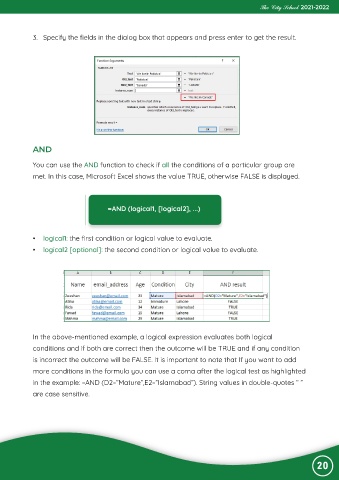
             3.  Specify the fields in the dialog box that appears and press enter to get the result.


             AND

             You can use the AND function to check if all the conditions of a particular group are

             met. In this case, Microsoft Excel shows the value TRUE, otherwise FALSE is displayed.


                                       =AND (logical1, [logical2], ...)


             •  logical1: the first condition or logical value to evaluate.

             •  logical2 [optional]: the second condition or logical value to evaluate.


             In the above-mentioned example, a logical expression evaluates both logical
             conditions and if both are correct then the outcome will be TRUE and if any condition

             is incorrect the outcome will be FALSE. It is important to note that If you want to add
             more conditions in the formula you can use a coma after the logical test as highlighted

             in the example: =AND (D2=”Mature”,E2=”Islamabad”). String values in double-quotes “ ”
             are case sensitive.


                                                                                                                20

