


Page 23 - Computing E-Book Grade 6
P. 23
The City School  2021-2022


                                                                                                                    Analysing Data


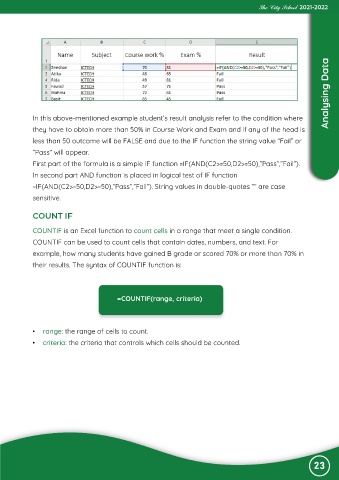
             In this above-mentioned example student’s result analysis refer to the condition where
             they have to obtain more than 50% in Course Work and Exam and if any of the head is

             less than 50 outcome will be FALSE and due to the IF function the string value “Fail” or
             “Pass” will appear.

             First part of the formula is a simple IF function =IF(AND(C2>=50,D2>=50),”Pass”,”Fail”).
             In second part AND function is placed in logical test of IF function

             =IF(AND(C2>=50,D2>=50),”Pass”,”Fail”). String values in double-quotes “” are case
             sensitive.


             COUNT IF

             COUNTIF is an Excel function to count cells in a range that meet a single condition.

             COUNTIF can be used to count cells that contain dates, numbers, and text. For
             example, how many students have gained B grade or scored 70% or more than 70% in

             their results. The syntax of COUNTIF function is:


                                          =COUNTIF(range, criteria)


            •  range: the range of cells to count.
            •  criteria: the criteria that controls which cells should be counted.


                                                                                                               23

