


Page 43 - Computing E-Book Grade 6
P. 43
The City School  2021-2022


             2.4.  Working with Page Borders


             A page border is a border that appears                           Checkpoint
             outside the margins on each page. Border art

             is a repeated small image that forms a border               The header is a section that appears in
                                                                         the top margin, while the footer is the
             around the outside of the document margins.                 section of document that appears in the    Document Creation
                                                                         bottom margin.
             Page borders are primarily for decoration; you              Hyperlinks provide access to websites
                                                                         and email addresses directly from your
             can use any style, colour, and line thickness you           document.
             want. You can also apply graphical borders (or

             border art) that repeat a small image as a pattern.

             Steps to insert page border


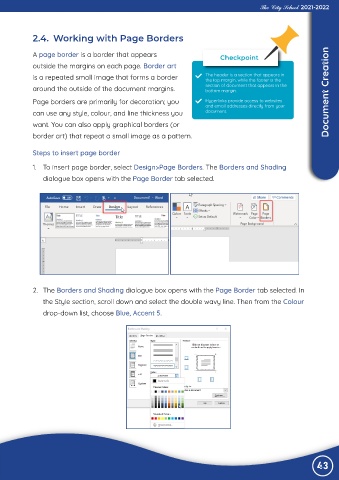
             1.  To insert page border, select Design>Page Borders. The Borders and Shading
                dialogue box opens with the Page Border tab selected.


             2.  The Borders and Shading dialogue box opens with the Page Border tab selected. In

                the Style section, scroll down and select the double wavy line. Then from the Colour

                drop-down list, choose Blue, Accent 5.


                                                                                                                43

