


Page 13 - Computing E-Book Grade 3
P. 13
The City School  2021-2022


                                                                                                                   Learning the Basics
          2.  You will then see the contents of the zip file. Click the file and drop it on your

              desktop, or another file location. The contents of the file will be unzipped, and
              you can then use it as needed.


           1.4.  Exploring File Properties


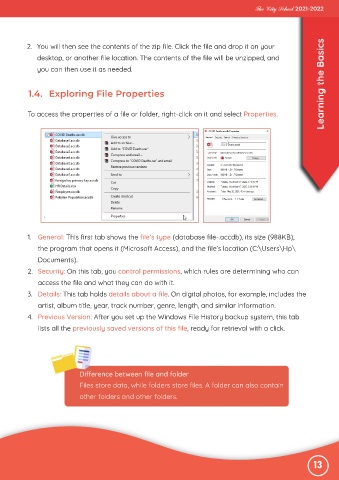
           To access the properties of a file or folder, right-click on it and select Properties.


           1.  General: This first tab shows the file’s type (database file-.accdb), its size (988KB),
              the program that opens it (Microsoft Access), and the file’s location (C:\Users\Hp\

              Documents).
           2.  Security: On this tab, you control permissions, which rules are determining who can

              access the file and what they can do with it.
           3.  Details: This tab holds details about a file. On digital photos, for example, includes the

              artist, album title, year, track number, genre, length, and similar information.
           4.  Previous Version: After you set up the Windows File History backup system, this tab

              lists all the previously saved versions of this file, ready for retrieval with a click.


                             Difference between file and folder
                             Files store data, while folders store files. A folder can also contain

                             other folders and other folders.


                                                                                                               13

