


Page 143 - Python Data Science Handbook
P. 143
In[15]: data[data.notnull()]
                   Out[15]: 0        1
                            2    hello
                            dtype: object

               The isnull()  and notnull()  methods produce similar Boolean results for Data
               Frames.

               Dropping null values
               In addition to the masking used before, there are the convenience methods, dropna()
               (which removes NA values) and fillna() (which fills in NA values). For a Series,
               the result is straightforward:
                   In[16]: data.dropna()
                   Out[16]: 0        1
                            2    hello
                            dtype: object
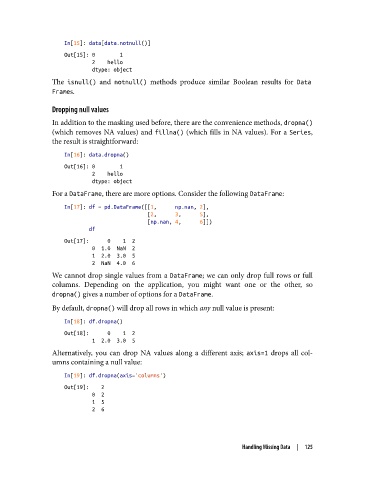
               For a DataFrame, there are more options. Consider the following DataFrame:

                   In[17]: df = pd.DataFrame([[1,      np.nan, 2],
                                              [2,      3,      5],
                                              [np.nan, 4,      6]])
                           df
                   Out[17]:      0    1  2
                            0  1.0  NaN  2
                            1  2.0  3.0  5
                            2  NaN  4.0  6
               We cannot drop single values from a DataFrame; we can only drop full rows or full
               columns. Depending on the application, you might want one or the other, so
               dropna() gives a number of options for a DataFrame.
               By default, dropna() will drop all rows in which any null value is present:

                   In[18]: df.dropna()
                   Out[18]:      0    1  2
                            1  2.0  3.0  5
               Alternatively, you can drop NA values along a different axis; axis=1  drops all col‐
               umns containing a null value:
                   In[19]: df.dropna(axis='columns')
                   Out[19]:    2
                            0  2
                            1  5
                            2  6


                                                                    Handling Missing Data  |  125

