


Page 141 - Python Data Science Handbook
P. 141
In[9]: np.nansum(vals2), np.nanmin(vals2), np.nanmax(vals2)
                   Out[9]: (8.0, 1.0, 4.0)
               Keep in mind that NaN  is specifically a floating-point value; there is no equivalent
               NaN value for integers, strings, or other types.

               NaN and None in Pandas

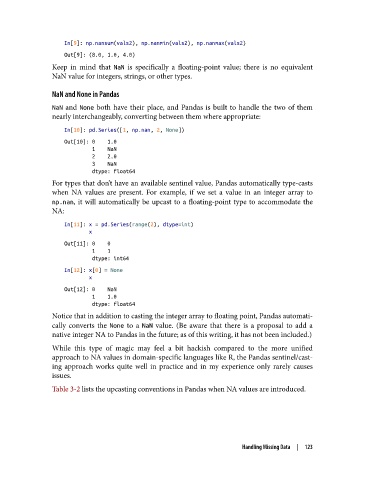
               NaN  and None  both have their place, and Pandas is built to handle the two of them
               nearly interchangeably, converting between them where appropriate:

                   In[10]: pd.Series([1, np.nan, 2, None])
                   Out[10]: 0    1.0
                            1    NaN
                            2    2.0
                            3    NaN
                            dtype: float64
               For types that don’t have an available sentinel value, Pandas automatically type-casts
               when NA values are present. For example, if we set a value in an integer array to
               np.nan, it will automatically be upcast to a floating-point type to accommodate the
               NA:
                   In[11]: x = pd.Series(range(2), dtype=int)
                           x
                   Out[11]: 0    0
                            1    1
                            dtype: int64
                   In[12]: x[0] = None
                           x
                   Out[12]: 0    NaN
                            1    1.0
                            dtype: float64
               Notice that in addition to casting the integer array to floating point, Pandas automati‐
               cally converts the None  to a NaN  value. (Be aware that there is a proposal to add a
               native integer NA to Pandas in the future; as of this writing, it has not been included.)
               While this type of magic may feel a bit hackish compared to the more unified
               approach to NA values in domain-specific languages like R, the Pandas sentinel/cast‐
               ing approach works quite well in practice and in my experience only rarely causes
               issues.
               Table 3-2 lists the upcasting conventions in Pandas when NA values are introduced.


                                                                    Handling Missing Data  |  123

