


Page 149 - Python Data Science Handbook
P. 149
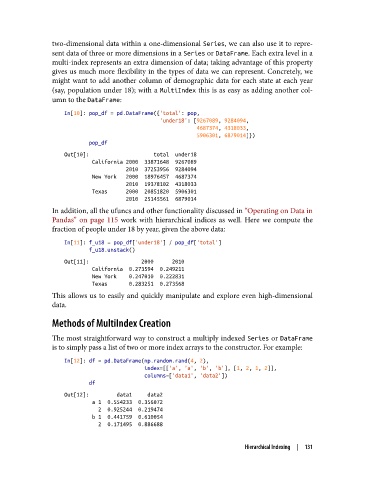
two-dimensional data within a one-dimensional Series, we can also use it to repre‐
               sent data of three or more dimensions in a Series or DataFrame. Each extra level in a
               multi-index represents an extra dimension of data; taking advantage of this property
               gives us much more flexibility in the types of data we can represent. Concretely, we
               might want to add another column of demographic data for each state at each year
               (say, population under 18); with a MultiIndex this is as easy as adding another col‐
               umn to the DataFrame:

                   In[10]: pop_df = pd.DataFrame({'total': pop,
                                                  'under18': [9267089, 9284094,
                                                              4687374, 4318033,
                                                              5906301, 6879014]})
                           pop_df
                   Out[10]:                     total  under18
                            California 2000  33871648  9267089
                                       2010  37253956  9284094
                            New York   2000  18976457  4687374
                                       2010  19378102  4318033
                            Texas      2000  20851820  5906301
                                       2010  25145561  6879014
               In addition, all the ufuncs and other functionality discussed in “Operating on Data in
               Pandas”  on page 115  work with hierarchical indices as well. Here we compute the
               fraction of people under 18 by year, given the above data:

                   In[11]: f_u18 = pop_df['under18'] / pop_df['total']
                           f_u18.unstack()
                   Out[11]:                 2000      2010
                            California  0.273594  0.249211
                            New York    0.247010  0.222831
                            Texas       0.283251  0.273568
               This allows us to easily and quickly manipulate and explore even high-dimensional
               data.
               Methods of MultiIndex Creation


               The most straightforward way to construct a multiply indexed Series or DataFrame
               is to simply pass a list of two or more index arrays to the constructor. For example:

                   In[12]: df = pd.DataFrame(np.random.rand(4, 2),
                                             index=[['a', 'a', 'b', 'b'], [1, 2, 1, 2]],
                                             columns=['data1', 'data2'])
                           df
                   Out[12]:         data1     data2
                            a 1  0.554233  0.356072
                              2  0.925244  0.219474
                            b 1  0.441759  0.610054
                              2  0.171495  0.886688


                                                                     Hierarchical Indexing  |  131

