


Page 502 - Python Data Science Handbook
P. 502
Choosing the covariance type

               If you look at the details of the preceding fits, you will see that the covariance_type
               option was set differently within each. This hyperparameter controls the degrees of
               freedom in the shape of each cluster; it is essential to set this carefully for any given
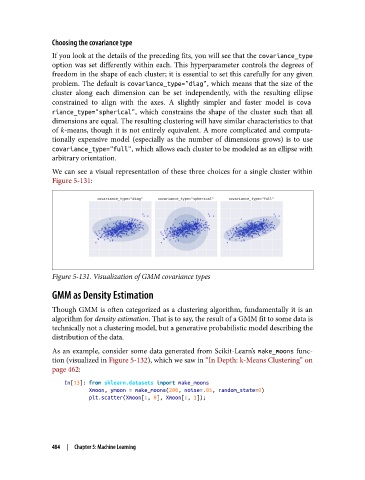
               problem. The default is covariance_type="diag", which means that the size of the
               cluster along each dimension can be set independently, with the resulting ellipse
               constrained  to align with the axes. A slightly simpler and faster model is cova
               riance_type="spherical", which constrains the shape of the cluster such that all
               dimensions are equal. The resulting clustering will have similar characteristics to that
               of k-means, though it is not entirely equivalent. A more complicated and computa‐
               tionally expensive model (especially as the number of dimensions grows) is to use
               covariance_type="full", which allows each cluster to be modeled as an ellipse with
               arbitrary orientation.

               We can see a visual representation of these three choices for a single cluster within
               Figure 5-131:


               Figure 5-131. Visualization of GMM covariance types

               GMM as Density Estimation
               Though GMM is often categorized as a clustering algorithm, fundamentally it is an
               algorithm for density estimation. That is to say, the result of a GMM fit to some data is
               technically not a clustering model, but a generative probabilistic model describing the
               distribution of the data.

               As an example, consider some data generated from Scikit-Learn’s make_moons  func‐
               tion (visualized in Figure 5-132), which we saw in “In Depth: k-Means Clustering” on
               page 462:
                   In[13]: from sklearn.datasets import make_moons
                           Xmoon, ymoon = make_moons(200, noise=.05, random_state=0)
                           plt.scatter(Xmoon[:, 0], Xmoon[:, 1]);


               484  |  Chapter 5: Machine Learning

