


Page 10 - MercNET User's Guide
P. 10
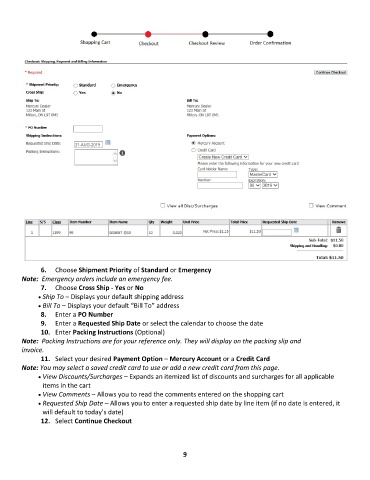
6.  Choose Shipment Priority of Standard or Emergency
        Note:  Emergency orders include an emergency fee.
               7.  Choose Cross Ship - Yes or No
              • •   Ship To – Displays your default shipping address
              • •   Bill To – Displays your default “Bill To” address
               8.  Enter a PO Number
               9.  Enter a Requested Ship Date or select the calendar to choose the date
               10.  Enter Packing Instructions (Optional)
        Note:  Packing Instructions are for your reference only. They will display on the packing slip and
        invoice.
               11.  Select your desired Payment Option – Mercury Account or a Credit Card
        Note: You may select a saved credit card to use or add a new credit card from this page.
              • •   View Discounts/Surcharges – Expands an itemized list of discounts and surcharges for all applicable
               items in the cart
              • •   View Comments – Allows you to read the comments entered on the shopping cart
              • •   Requested Ship Date – Allows you to enter a requested ship date by line item (if no date is entered, it
               will default to today’s date)
               12.  Select Continue Checkout


                                                              9

