


Page 42 - MercNET User's Guide
P. 42
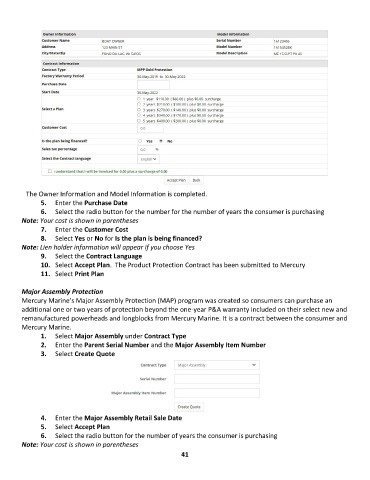
The Owner Information and Model Information is completed.
               5.  Enter the Purchase Date
               6.  Select the radio button for the number for the number of years the consumer is purchasing
        Note: Your cost is shown in parentheses
               7.  Enter the Customer Cost
               8.  Select Yes or No for Is the plan is being financed?
        Note: Lien holder information will appear if you choose Yes
               9.  Select the Contract Language
               10.  Select Accept Plan.  The Product Protection Contract has been submitted to Mercury
               11.  Select Print Plan

        Major Assembly Protection
        Mercury Marine’s Major Assembly Protection (MAP) program was created so consumers can purchase an
        additional one or two years of protection beyond the one-year P&A warranty included on their select new and
        remanufactured powerheads and longblocks from Mercury Marine. It is a contract between the consumer and
        Mercury Marine.
               1.  Select Major Assembly under Contract Type
               2.  Enter the Parent Serial Number and the Major Assembly Item Number
               3.  Select Create Quote


               4.  Enter the Major Assembly Retail Sale Date
               5.  Select Accept Plan
               6.  Select the radio button for the number of years the consumer is purchasing

        Note: Your cost is shown in parentheses
                                                             41

