


Page 44 - MercNET User's Guide
P. 44
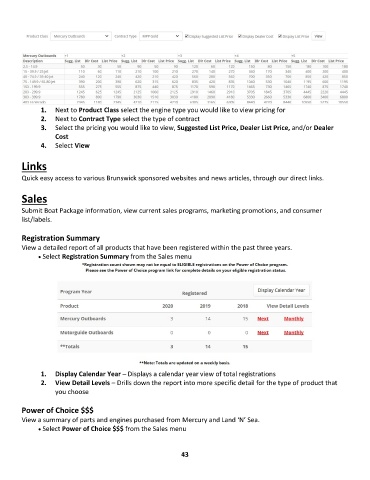
1 1. .    Next to Product Class select the engine type you would like to view pricing for
               2 2. .    Next to Contract Type select the type of contract
               3 3. .    Select the pricing you would like to view, Suggested List Price, Dealer List Price, and/or Dealer
                   Cost
               4 4. .    Select View

        Links

        Quick easy access to various Brunswick sponsored websites and news articles, through our direct links.

        Sales

        Submit Boat Package information, view current sales programs, marketing promotions, and consumer
        list/labels.

        Registration Summary
        View a detailed report of all products that have been registered within the past three years.
              • •   Select Registration Summary from the Sales menu


               1.  Display Calendar Year – Displays a calendar year view of total registrations
               2.  View Detail Levels – Drills down the report into more specific detail for the type of product that
                   you choose

        Power of Choice $$$
        View a summary of parts and engines purchased from Mercury and Land ‘N’ Sea.
              • •   Select Power of Choice $$$ from the Sales menu


                                                             43

