


Page 38 - MercNET User's Guide
P. 38
Closed Claims
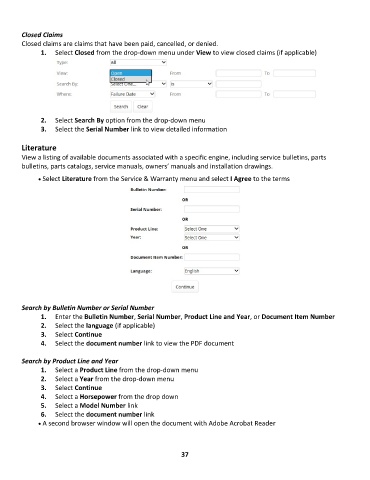
        Closed claims are claims that have been paid, cancelled, or denied.
               1.  Select Closed from the drop-down menu under View to view closed claims (if applicable)


               2.  Select Search By option from the drop-down menu
               3.  Select the Serial Number link to view detailed information

        Literature
        View a listing of available documents associated with a specific engine, including service bulletins, parts
        bulletins, parts catalogs, service manuals, owners’ manuals and installation drawings.
              • •   Select Literature from the Service & Warranty menu and select I Agree to the terms


        Search by Bulletin Number or Serial Number
               1.  Enter the Bulletin Number, Serial Number, Product Line and Year, or Document Item Number
               2.  Select the language (if applicable)
               3.  Select Continue
               4.  Select the document number link to view the PDF document

        Search by Product Line and Year
               1.  Select a Product Line from the drop-down menu
               2.  Select a Year from the drop-down menu
               3.  Select Continue
               4.  Select a Horsepower from the drop down
               5.  Select a Model Number link
               6.  Select the document number link
              • •   A second browser window will open the document with Adobe Acrobat Reader


                                                             37

