


Page 34 - MercNET User's Guide
P. 34
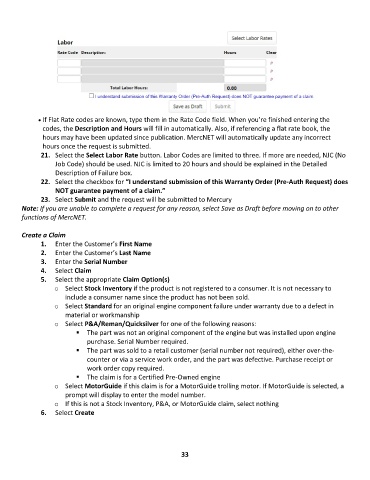
• •   If Flat Rate codes are known, type them in the Rate Code field. When you’re finished entering the
               codes, the Description and Hours will fill in automatically. Also, if referencing a flat rate book, the
               hours may have been updated since publication. MercNET will automatically update any incorrect
               hours once the request is submitted.
               21.  Select the Select Labor Rate button. Labor Codes are limited to three. If more are needed, NJC (No
                   Job Code) should be used. NJC is limited to 20 hours and should be explained in the Detailed
                   Description of Failure box.
               22.  Select the checkbox for “I understand submission of this Warranty Order (Pre-Auth Request) does
                   NOT guarantee payment of a claim.”
               23.  Select Submit and the request will be submitted to Mercury
        Note: If you are unable to complete a request for any reason, select Save as Draft before moving on to other
        functions of MercNET.

        Create a Claim
               1.  Enter the Customer’s First Name
               2.  Enter the Customer’s Last Name
               3.  Enter the Serial Number
               4.  Select Claim
               5.  Select the appropriate Claim Option(s)
                   o  Select Stock Inventory if the product is not registered to a consumer. It is not necessary to
                       include a consumer name since the product has not been sold.
                   o  Select Standard for an original engine component failure under warranty due to a defect in
                       material or workmanship
                   o  Select P&A/Reman/Quicksilver for one of the following reasons:
                          ▪  The part was not an original component of the engine but was installed upon engine
                              purchase. Serial Number required.
                          ▪  The part was sold to a retail customer (serial number not required), either over-the-
                              counter or via a service work order, and the part was defective. Purchase receipt or
                              work order copy required.
                          ▪  The claim is for a Certified Pre-Owned engine
                   o  Select MotorGuide if this claim is for a MotorGuide trolling motor. If MotorGuide is selected, a
                       prompt will display to enter the model number.
                   o  If this is not a Stock Inventory, P&A, or MotorGuide claim, select nothing
               6.  Select Create


                                                             33

