


Page 33 - MercNET User's Guide
P. 33
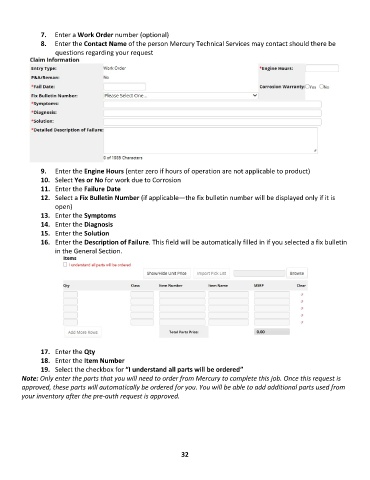
7.  Enter a Work Order number (optional)
               8.  Enter the Contact Name of the person Mercury Technical Services may contact should there be
                   questions regarding your request


               9.  Enter the Engine Hours (enter zero if hours of operation are not applicable to product)
               10.  Select Yes or No for work due to Corrosion
               11.  Enter the Failure Date
               12.  Select a Fix Bulletin Number (if applicable—the fix bulletin number will be displayed only if it is
                   open)
               13.  Enter the Symptoms
               14.  Enter the Diagnosis
               15.  Enter the Solution
               16.  Enter the Description of Failure. This field will be automatically filled in if you selected a fix bulletin
                   in the General Section.


               17.  Enter the Qty
               18.  Enter the Item Number
               19.  Select the checkbox for “I understand all parts will be ordered”
        Note: Only enter the parts that you will need to order from Mercury to complete this job. Once this request is
        approved, these parts will automatically be ordered for you. You will be able to add additional parts used from
        your inventory after the pre-auth request is approved.


                                                             32

