


Page 113 - Installation Manual - GenII DTS
P. 113
Accessories
            Auxiliary Trim Harness Connections

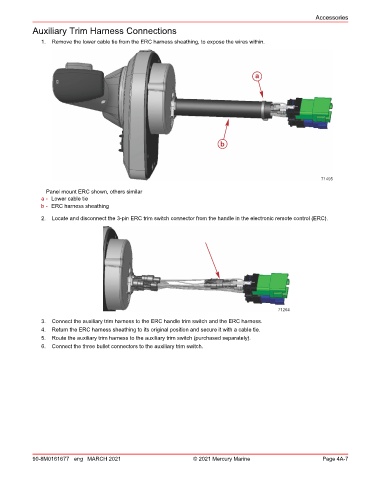
               1.  Remove the lower cable tie from the ERC harness sheathing, to expose the wires within.


                                                                                     a


                                                                          b


                                                                                                           71495

                Panel mount ERC shown, others similar
               a - Lower cable tie
               b - ERC harness sheathing
               2.  Locate and disconnect the 3‑pin ERC trim switch connector from the handle in the electronic remote control (ERC).


                                                                                             71264
               3.  Connect the auxiliary trim harness to the ERC handle trim switch and the ERC harness.
               4.  Return the ERC harness sheathing to its original position and secure it with a cable tie.
               5.  Route the auxiliary trim harness to the auxiliary trim switch (purchased separately).
               6.  Connect the three bullet connectors to the auxiliary trim switch.


            90-8M0161677 eng MARCH 2021                          © 2021 Mercury Marine                      Page 4A-7

